
A modern PC gamer’s hard drive is a sprawling digital bazaar: Steam here, Epic there, a handful of GOG classics, maybe an Xbox Game Pass title or two. Switching between launchers with a keyboard and mouse is fine at a desk—but sprawled on the couch with a controller in hand, it’s a buzzkill. For years, players have turned to unified launchers like Heroic Games Launcher and Playnite to wrestle their libraries into order. Now warmUP enters the fray, promising a console-like living-room experience with zero friction. I’ve tested all three to see which one actually deserves a spot on your big-screen gaming PC.
Heroic Games Launcher: The Cross-Platform Champion for Epic and GOG
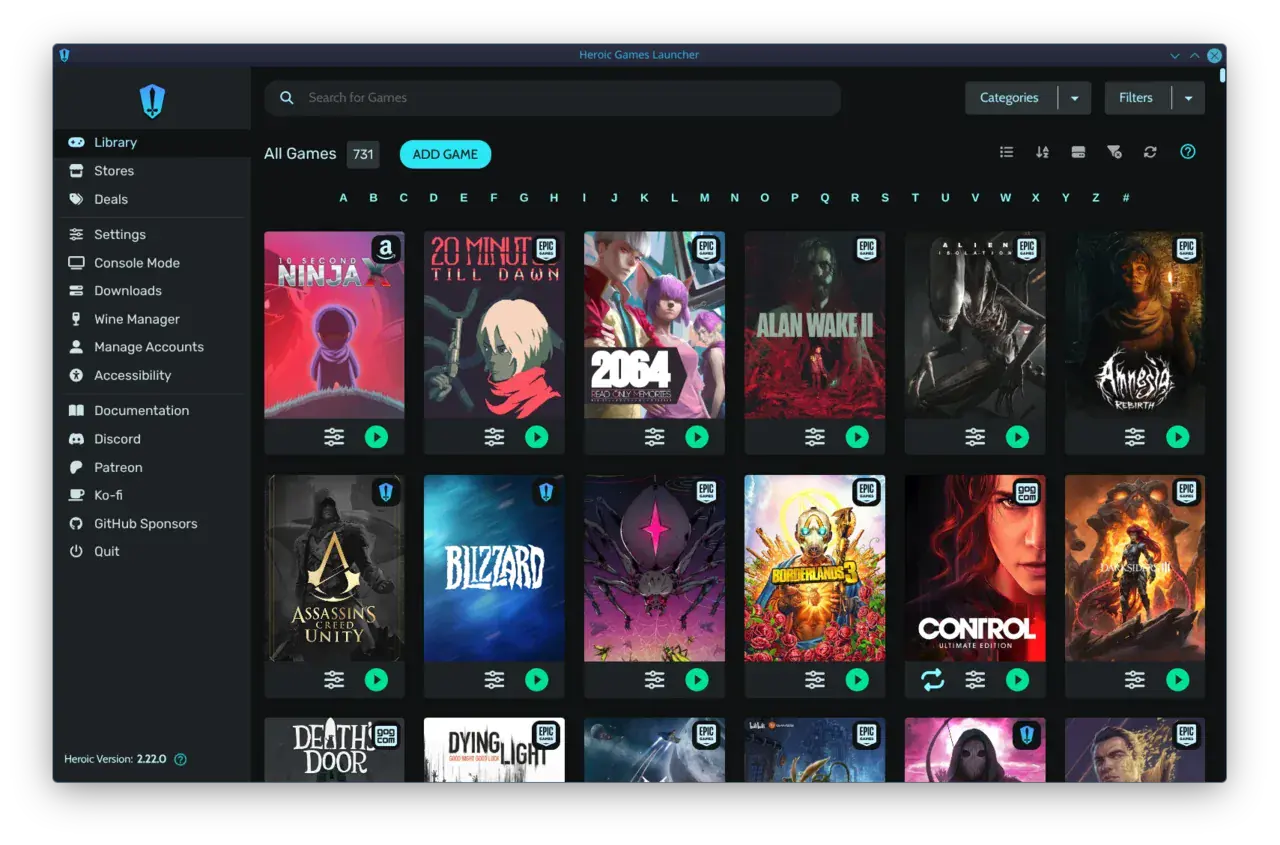
Heroic Games Launcher emerged as an open-source darling for Linux users who were tired of Epic’s and GOG’s official clients—or lack thereof. Built with web technologies and available on Linux, Windows, and macOS, it lets you log into your Epic Games, GOG, or Amazon account and handle everything from installing and updating to cloud-save syncing. On Linux and Steam Deck, it shines brightest, integrating Wine and Proton so Windows games run without breaking a sweat. The app can even import your existing Epic Games Store installation and show ProtonDB compatibility ratings right in the library.
Heroic focuses on providing a lightweight open-source launcher that allows users to access Epic Games Store and GOG libraries without relying on official clients. That philosophy keeps it lean—Heroic won’t bloat your system with extra processes. It also features custom theming, a download queue, and the ability to add external games. However, its library is deliberately narrow: only those three storefronts. If your collection sprawls across Steam, Battle.net, or Ubisoft Connect, Heroic won’t see them. And crucially, there’s no controller-friendly fullscreen mode; the interface remains a traditional desktop affair optimized for mouse and keyboard.
Playnite: The Do-Everything Library Manager for Power Users
If Heroic is a scalpel, Playnite is the entire surgical suite. This free, open-source game library manager for Windows consolidates titles from Steam, Epic, GOG, EA App, Battle.net, Ubisoft Connect, Xbox PC, itch.io, and dozens more via community plugins—over 44 integration plugins are listed in its documentation. It doesn’t just show installed games; it also pulls in your entire cloud library, including uninstalled titles, so you can browse your full collection. Emulation support is robust, with pre-configured settings for popular consoles and the ability to add any emulator that accepts command-line arguments.
Playnite’s real magic is customization. Its appearance can be completely overhauled with community themes—from minimalist grids to PS5-like dashboards—and extensions add everything from playtime tracking to extra metadata sources. A dedicated Fullscreen mode transforms the UI into a controller-driven interface reminiscent of Steam’s old Big Picture mode, perfect for couch sessions. But that power comes with a catch: getting Playnite to this state is a project. Out of the box, you’ll spend an afternoon linking accounts, installing plugins, tweaking themes, and configuring emulators. The pay-off is a tailor-made library manager, but it’s undeniably a power user’s tool.
warmUP: The Couch-First Launcher That Cuts the Tinkering
warmUP takes a radically different approach: it’s built from the ground up for the living room. Instead of asking you to install plugins or configure stores manually, warmUP auto-detects Steam, Epic, GOG, and Xbox installations the moment you open it. Every game is then pulled into a single, beautiful grid governed by a controller. Big cover art, focus rings, and one-button launching make it feel like a first-party console dashboard. The setup is measured in seconds, not hours, and a free tier means you can try it without spending a dime.
Where Heroic demands separate client logins for each store and Playnite expects you to curate plugins, warmUP simply works. It won’t show you every obscure indie platform or emulate a Sega Saturn—it’s not trying to. Instead, it excels at the core living-room use case: boot to play, all from a gamepad. For anyone who’s ever wanted to turn a Windows PC into a true console-like device without wrestling with configuration files, warmUP is the most polished answer yet.
What the Community Actually Says About Heroic and Playnite
“Heroic focuses on providing a lightweight open-source launcher that allows users to access Epic Games Store and GOG libraries without relying on official clients, while Playnite acts as a unified game library manager that aggregates titles from multiple platforms and emulators into one customizable interface.”
— theserverhost.com
Scrolling through r/linux_gaming and r/Playnite reveals a familiar tension. Heroic’s fans adore its clean Linux and Steam Deck integration, but the absence of a big-screen controller mode is a constant sore spot. Heroic does not provide a dedicated controller-focused fullscreen mode. Meanwhile, Playnite enthusiasts celebrate the 44+ integrations yet frequently grumble about maintenance: only some library plugins fully replace their respective service clients, and store client updates can break third-party connectors. The consensus? Both tools are excellent if you’re willing to invest the time, but neither nails the effortless couch experience out of the box.
At a Glance: Heroic vs Playnite vs warmUP
| HeroicLightweight cross-platform store launcher | PlayniteUltimate customizable library manager | warmUPtrophyThe effortless couch launcher | |
|---|---|---|---|
| Store integrations | 3 (Epic, GOG, Amazon) | 44+ via plugins | Auto-detect (Steam, Epic, GOG, Xbox) |
| Fullscreen controller mode | cancel | check_circle | check_circle |
| Setup time | Minutes | Hours (plugins & themes) | Under 1 minute |
| Cross-platform | Linux, Windows, macOS | Windows only | Windows |
| Emulation support | cancel | check_circle | cancel |
| Ideal for | Linux & Steam Deck | Power users, big libraries | Couch, console simplicity |
| Price | Free | Free | Free tier |
Ready for the couch?
Turn your PC into the console your library deserves
Get the free download link at launch. warmUP unifies your games and puts the controller front and center with zero tinkering required.
Bottom line: which launcher fits your gaming life?
- Choose Heroic if you live on Linux or a Steam Deck and want a clean way to manage Epic, GOG, and Amazon titles without the official bloat.
- Choose Playnite if you love customization, manage dozens of launchers and emulators, and don’t mind investing time to build your perfect library.
- Choose warmUP if you want to kick back on the couch, pick up a controller, and start playing—instantly, with no fiddling required.
Written by
Rosa del Pero
Senior Gaming Editor
Rosa covers launchers, storefronts and the tools that shape how we play on PC. She has spent a decade reviewing gaming software and still believes the couch is the best seat in the house.
Comments
Loading comments…