

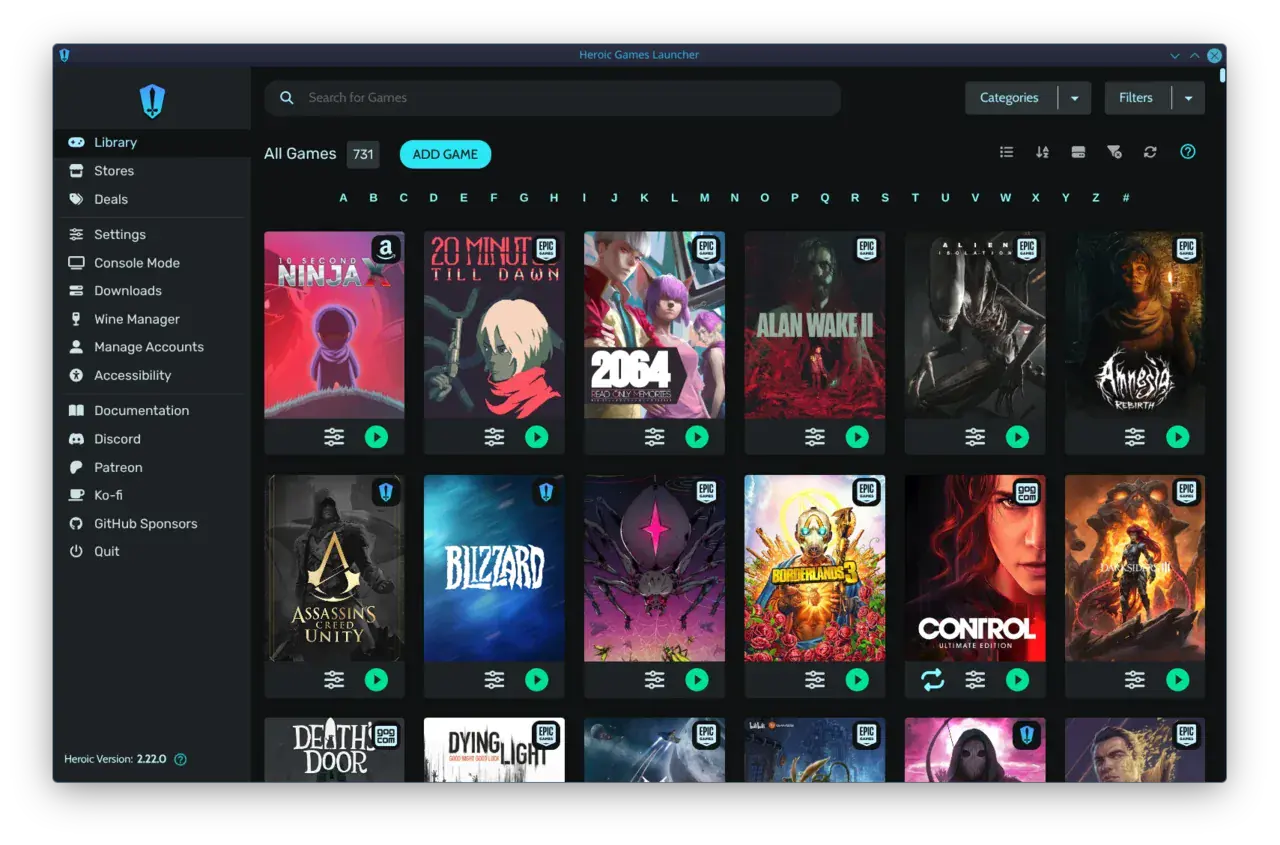
Playnite vs Heroic comes down to scope vs. focus: Playnite unifies almost everything - Steam, Epic, GOG, and emulators - with a true controller-first Fullscreen mode, while Heroic is a lighter, focused launcher for Epic, GOG and Amazon Games with a useful Console Mode for TV and Steam Deck.
The Launcher Chaos on a Modern Gaming PC
If your library is split between Steam, Epic freebies, GOG classics, and Amazon Prime Gaming, you feel the friction every time you hunt for a game. Steam holds most of your hours, Epic holds the games you claimed and forgot, GOG holds the DRM-free builds, and Amazon holds another pile you rarely open.
Playnite and Heroic both fix that, but from opposite angles. Playnite is a library manager first: it doesn't sell games, it pulls your existing libraries together via official integrations and community plugins. Heroic is a store launcher replacement: it lets you browse, install, and play Epic, GOG, and Amazon games directly without opening their native clients, with built-in Wine/Proton handling on Linux and macOS.
For players searching playnite vs heroic games launcher, the practical question is not which is "better" overall, but which matches how you actually play. Do you want one place for every store and emulator, or a simple, fast way to handle Epic/GOG/Amazon without the bloat?
Store Support: The Core Difference in Playnite vs Heroic
This is the clearest split. Playnite supports the widest unified PC game library launcher approach. Out of the box it integrates Steam, Epic, GOG, Origin/EA App, Ubisoft Connect, Battle.net and more, plus emulators and manual imports. Community extensions add even more stores and metadata sources, so you can see everything in one grid.
Heroic is intentionally narrower. According to its homepage, Heroic is a free and open source launcher for Epic, GOG and Amazon Prime Games on Linux, Windows, macOS and the Steam Deck. It lets you access those three stores inside the app, claim free games, buy new ones, and manage installs from a single download queue with pause/resume and speed readouts.
That focus is a feature, not a limitation, if those three stores are your pain point. Heroic handles Windows versions of games on Linux/macOS, manages Wine-GE, Proton-GE, Wine-Crossover and Game Porting Toolkit versions via its Wine Manager, and lets you pull custom art from SteamGridDB so non-Steam games look right. Playnite, by contrast, relies on your installed clients or plugins to launch games and leans on community themes and add-ons for artwork and metadata.
The Couch Test: Controller Navigation and Big Picture Modes
For couch gaming, Playnite has the more complete controller story. Its dedicated Fullscreen mode is built for TV use - big tiles, gamepad navigation, no mouse needed - and the community has built couch-optimized themes that mimic console UIs. That's why playnite big picture mode is a common search: players want Steam Big Picture, but for their entire library.
Heroic also offers a controller-friendly option. Its Console Mode switches to a full-screen, controller-friendly interface made for the TV and Steam Deck, letting you browse, install and launch without a mouse. It works well on Deck and on a living-room PC, especially for quickly launching Epic/GOG titles.
In practice, the difference is polish and depth. Playnite's Fullscreen mode was designed as a primary couch interface with extensive theme support and controller mapping, so it feels closer to a console dashboard. Heroic launcher controller support is functional and improving, but navigation is more basic and the desktop interface is still the main experience. If your PC lives under the TV and you want the best open source game launcher for couch gaming, Playnite currently offers the more refined lean-back flow.
Setup and Ease of Use
Heroic wins on zero-to-play speed for its supported stores. Download the installer for Windows, macOS or Linux (Flatpak/AppImage), log into Epic/GOG/Amazon, and you can install games directly. No extra clients required for those stores, and Wine/Proton versions are managed inside Heroic on Linux/macOS with sensible defaults.
Playnite asks for a bit more upfront. You install Playnite, connect your accounts, and let it import libraries. For full coverage you will enable plugins, pick a theme, and configure emulators if you use them. That initial setup takes 10-15 minutes, but then automation handles metadata, playtime tracking, and library updates across all stores.
Think of it this way: Heroic is plug-and-play for Epic/GOG/Amazon. Playnite is a weekend project that becomes a set-and-forget command center. If you only need to tame Epic and GOG, Heroic is faster. If you want everything - including Steam, itch.io, and retro libraries - in one searchable place, Playnite's extra configuration pays off.
Performance and Resource Footprint
Both are lightweight compared to running multiple store clients, but they behave differently. Heroic is generally the lighter app. It is built to be cross-platform and privacy-first with no ads, and it stays lean even with a large Epic/GOG queue.
Playnite is still efficient on modern hardware, but its footprint scales with what you add. A clean install with default theme is snappy. Add dozens of plugins, heavy animated themes, and thousands of games with high-res covers, and RAM and startup time climb. Most gaming PCs won't notice, but on a low-power HTPC or older laptop, Heroic will feel lighter.
Neither launcher hammers your GPU while idle. The practical impact is startup and library sync time, not in-game FPS. If you keep Playnite curated - disable unused integrations, pick a performant theme - the difference shrinks to seconds.
Playnite vs Heroic at a Glance
| PlayniteUniversal library manager | HeroicFocused Epic/GOG/Amazon launcher | warmUPtrophyCouch-first unified launcher | |
|---|---|---|---|
| Store coverage | Steam, Epic, GOG, EA, Ubisoft, Battle.net, emulators via plugins | Epic, GOG, Amazon Prime Games | Steam, Epic, GOG, emulators - unified view |
| Controller / TV mode | Fullscreen mode, deep theme support | Console Mode for TV/Deck | Controller-first from boot, no setup |
| Setup complexity | Medium - plugins/themes to configure | Low - log in and install | Zero-setup - works out of the box |
| Platforms | Windows (Linux via Wine) | Windows, macOS, Linux, Steam Deck | Windows PC for TV/couch |
| Best for | Complete library + couch dashboard | Lightweight Epic/GOG/Amazon handling | Living-room PC, gamepad-only use |
Verdict: Which Launcher Fits Your Setup?
Choose Heroic if your problem is specific: you claim a lot of Epic and Amazon freebies, you buy on GOG, and you want a clean, open-source way to install and run those games - especially on Linux, macOS, or Steam Deck - without juggling their launchers. Its Wine/Proton management and built-in store access make it the simplest tool for that job.
Choose Playnite if your problem is breadth and couch control. If you want one searchable, controller-navigable library for Steam plus Epic, GOG, and emulators, with a true Fullscreen mode you can drive entirely from a gamepad on the TV, Playnite is the stronger pick. You trade a little setup time for a lot more coverage and customization.
Many players actually use both: Heroic to handle Epic/GOG installs cleanly, Playnite to surface everything in a unified, couch-friendly front end. If you only want one, match it to your library size and where you play - desk vs. sofa.
Playing from the couch?
Get a controller-first library without the setup
If Playnite feels like too much config and Heroic feels too narrow for your full library, warmUP gives you a unified, couch-ready view that just works with a gamepad on your TV. Free download, no tweaking themes or plugins.
Key Takeaways
- Playnite unifies the most stores and emulators via plugins and offers a polished Fullscreen mode for controller/TV use.
- Heroic is lighter and simpler for Epic, GOG and Amazon Games, with built-in store browsing, download queue, and Wine/Proton management on Linux/macOS.
- For couch gaming, Playnite's Fullscreen mode is more refined; Heroic's Console Mode is handy but more basic.
- Heroic is faster to set up for its three stores; Playnite needs more initial config but becomes a full library command center.
- Use Heroic for focused Epic/GOG/Amazon handling, Playnite for a complete unified library, or both together if you want coverage + simplicity.
Written by
Rosa del Pero
Senior Gaming Editor
Rosa covers launchers, storefronts and the tools that shape how we play on PC. She has spent a decade reviewing gaming software and still believes the couch is the best seat in the house.
Comments(0)
No comments yet. Be the first to share your thoughts.