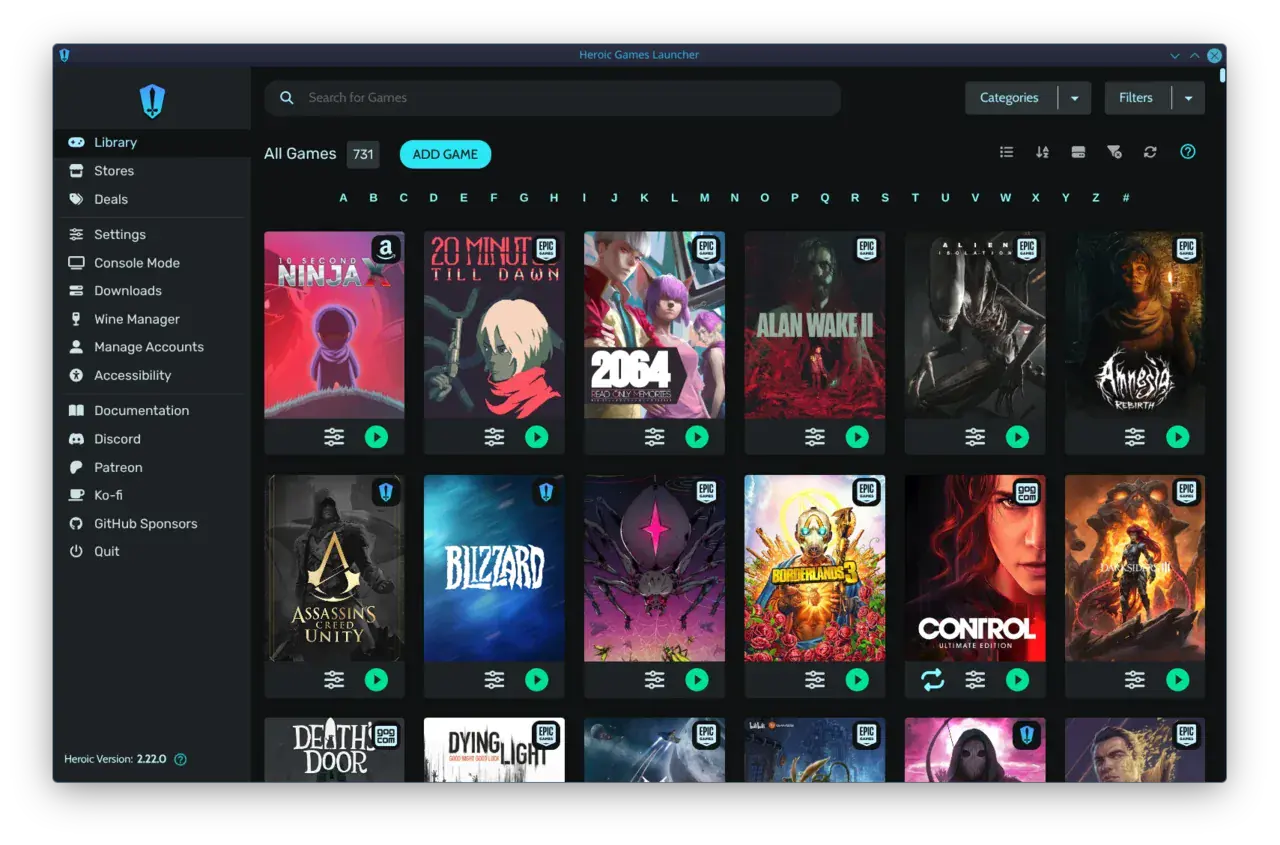


2026 is a monster year for PC gaming, especially if you want to sink into the sofa and control the action from a controller. God of War Laufey, Gears of War: E-Day, and other heavy-hitters demand real hardware — but building a 2026 couch gaming PC build that handles 4K/60fps without sounding like a datacenter is absolutely doable. I’ve tracked down the latest confirmed specs, sifted through community SFF builds, and mapped out the exact component stack that’ll let you launch these blockbusters from the TV with zero fuss. The secret isn't just in the GPU; it’s also in the software layer that finally makes a PC feel like a console. Let’s get building.
The Hardware Muscle for a 2026 Couch Gaming PC Build
Gears of War: E-Day sets the bar. The Coalition’s Unreal Engine 5 prequel not only requires a DirectX 12 Ultimate GPU with hardware ray tracing — it flat-out won’t launch without one. Minimum GPUs include the RTX 5050, GeForce RTX 2060, Radeon RX 6600, or Intel Arc A580, paired with a Ryzen 5 2600X or Core i5-10400 and 12 GB of RAM. The recommended spec lands at an RTX 5060/RTX 3060 Ti, Radeon RX 6700 XT, or Arc B580, a Ryzen 5 5600/i5-11600K, and 16 GB system memory. And since the game weighs in at a colossal 130 GB on an SSD, you’ll need serious storage too.
God of War Laufey hasn’t leaked official numbers yet, but Santa Monica Studio’s previous PC port and the UE5 trajectory tell us it’ll sit in the same ballpark. Building for 4K/60fps with room to spare means we look one tier above the recommended GPU. Community consensus and the latest living-room guides point to the NVIDIA GeForce RTX 5070 (12 GB VRAM) as the sweet spot, reliably pushing 60+ FPS in demanding titles with DLSS Quality enabled. On the red team, the AMD Radeon RX 8700 XT (16 GB) counters with strong raw raster and a larger frame buffer, making it a compelling choice if you’re allergic to upscaling. I’d lean toward the RTX 5070 for its ray tracing backbone and cooler, quieter partner cards in SFF sandwich layouts.
“For 4K/60fps gaming in 2026, the NVIDIA RTX 5070 (12GB VRAM) is cited as a sweet spot, delivering 60+ FPS in demanding titles with DLSS Quality.”
— Embers Las Vegas, Living Room Gaming PC guide
On the CPU side, you want high performance with minimal heat in a cramped case. The AMD Ryzen 7 9700X (8-core, 65W TDP) is the couch-king right now — plenty of gaming headroom without dumping excess wattage into your TV stand. Intel’s Core i5-14600K can match its frame rates, but it runs noticeably hotter and demands at least a 240mm AIO, which complicates small enclosures. Pair the Ryzen chip with 32 GB of DDR5-6000 (CL30) to keep the system snappy and future-proof, plus a lightning-fast 2 TB PCIe Gen 4 NVMe SSD — you’ll need the space when Gears E-Day alone grabs 130 GB.
Small, Silent, Living-Room Ready
The case is where most couch builds go wrong. You want something that blends with your AV stack, doesn’t scream “I’m a PC,” and keeps temperatures in check without jet-engine acoustics. Two champion options today are the Fractal Design Terra and the NZXT H1 v2, both under 20 liters and capable of swallowing cards up to 330mm long. They stand vertically, looking like a chunky router or a designer subwoofer.

Thermals, however, are the anxiety trigger. Sandwich-layout cases like these separate the CPU and GPU into distinct thermal zones, which helps, but you still need smart airflow. The playbook from the SFF community works: use a single slow-spinning 120mm exhaust fan to create a chimney effect rather than cramming a symphony of tiny screamers. Have an RTX 5070 with a flow-through cooler? Some builders deshroud the card and mount slim 120mm fans directly to the heatsink, dropping temps by 8–12°C — a bit advanced, but extremely effective. For the CPU, the 9700X’s 65W TDP lets a low-profile air cooler (like a Noctua NH-L12S or Thermalright AXP120-X67) keep things whisper-quiet even during God of War battles.
“I want to put a 5080 in a Terra for the living room but I'm terrified it'll sound like a jet engine during Gears: E-Day cutscenes. The thermal puzzle is the worst part of SFF.”
— Reddit, r/sffpc
The Sofa Saboteur: Why Software Kills Couch PC Joy
You could have the sweetest SFF rig on the planet, but the moment a Windows UAC prompt appears or a launcher insists you click “Update Now” with a mouse, the console illusion is dead. The core problem is that modern PC gaming is split across Steam, Epic, GOG, Xbox Game Pass, and launchers that assume a keyboard is nearby. Even Valve’s own Big Picture Mode, the gold standard for controller navigation, only truly shines inside the Steam ecosystem. Adding non-Steam games requires manual shortcuts and often breaks controller support.

“Every time I boot up my living room PC, I end up having to grab the wireless keyboard because some launcher popped an update window that doesn't support controller input. It completely ruins the console-like experience.”
— Reddit, r/htpc
And it’s not just storefronts. Driver updates, BIOS settings, even the Windows login screen can chain you to a desk peripheral. A 2026 couch gaming PC build only earns its place in the living room if you solve this invisible UI layer.
Reclaim Your Couch: Software Fixes That Actually Work
The first line of defence is configuring Steam to boot straight into Big Picture Mode (Settings > Interface > Start Steam in Big Picture Mode). That catches most Steam titles nicely. To navigate outside Steam, tools like Controller Companion ($2.99 on Steam) map an on-screen keyboard and mouse to your controller sticks, turning a gamepad into a universal pointer for desktop moments. Many couch gamers combine this with a unified launcher — Playnite in fullscreen mode aggregates all your libraries and launches games without ever touching a mouse, though it still requires initial setup and per-store credential handling.

But here’s the reality: tweaking toggles and installing overlays shouldn’t be the entry fee for couch comfort. That’s where a controller-first design from the ground up changes the game. warmUP, a new pre-launch launcher built specifically for the TV sofa, strips away the setup entirely. It scans your installed games across Steam, Epic, GOG, and emulators automatically and presents one unified library navigable entirely with a controller — no configuration, no Big Picture hacks. It’s the missing piece that makes a custom-built couch PC behave like a console the second you press the power button.
DIY Couch PC vs. Valve’s 2026 Steam Machine
Valve is planting a flag in the living room again. The new Steam Machine (announced November 2025, launching Summer 2026) packs SteamOS 3 into a tiny 2.6 kg box with a user-replaceable M.2 SSD and DDR5 RAM. It’s an impressive all-in-one console competitor, tightly integrated with the Steam ecosystem. However, SteamOS remains Linux-based, which means playing games from Epic, GOG, or Xbox Game Pass without complicated workarounds is not on the menu. The Steam Machine’s promise of console simplicity works flawlessly — as long as you never leave Steam’s walled garden.

A custom-built Windows couch PC, armed with warmUP’s zero-setup aggregation, flips that script. You get the same boot-to-play, controller-driven experience but with true store-agnostic freedom. Your Epic freebies, your GOG classics, your Game Pass library — all living alongside Steam titles in one sofa-friendly interface. And with a hand-picked RTX 5070 and a cool-running Ryzen CPU, you’re pushing far more frames than any compact Linux appliance can currently deliver. For 2026, the ultimate living-room machine is still a DIY build; it just needs warmUP to finally feel like a console.
Finish the Dream
Your New Couch PC Deserves a Console-like Launcher
You’ve specced the perfect SFF rig. Now give it the controller-first software layer that boots you straight into God of War or Gears: E-Day with zero setup. warmUP unifies every store, requires no keyboard, and gets you playing from the sofa the way a gaming PC always should.
Build Your 2026 Couch Paradise
- GPU: RTX 5070 (12 GB) or RX 8700 XT — handles 4K/60 in Gears: E-Day and God of War with ease.
- CPU: Ryzen 7 9700X — gaming muscle at 65W, perfect for tight, silent cases.
- Case: Fractal Design Terra or NZXT H1 v2 — sub‑20L, vertical, AV-stack friendly.
- Storage: 2 TB PCIe 4.0 NVMe — Gears: E-Day alone needs 130 GB.
- Software: warmUP (join the waitlist) for zero-fuss controller navigation across all stores, plus Controller Companion for any leftover desktop moments.
Written by
Mika Lindqvist
Hardware & Performance
Mika benchmarks everything that runs a game — from handhelds to living-room rigs. If a frame drops, he wants to know why.
Comments
Loading comments…