
Skip to content
Free forever — launches soon

Not only a game launcher.
A whole ecosystem.

We believe your PC should disappear the moment you pick up a controller. Stores, emulators, and Seamless Game Start live in one couch-first home — so every game you own feels like one console.

Steam · Epic · GOG · Xbox · EA · Emulators

By continuing, you share your email so we can start your free warmUP download. Next you choose whether you also want product updates by email — download-only means no further email from us. See our Privacy Policy.

Free forever · No credit card · Free download.

5,278+ players are already visited warmUP
Join our Discord server

The two that matter most

Seamless Game Start. Emulators included.

This is what the ecosystem is for. Pick any game you own — storefront or retro — and play without a desktop detour.

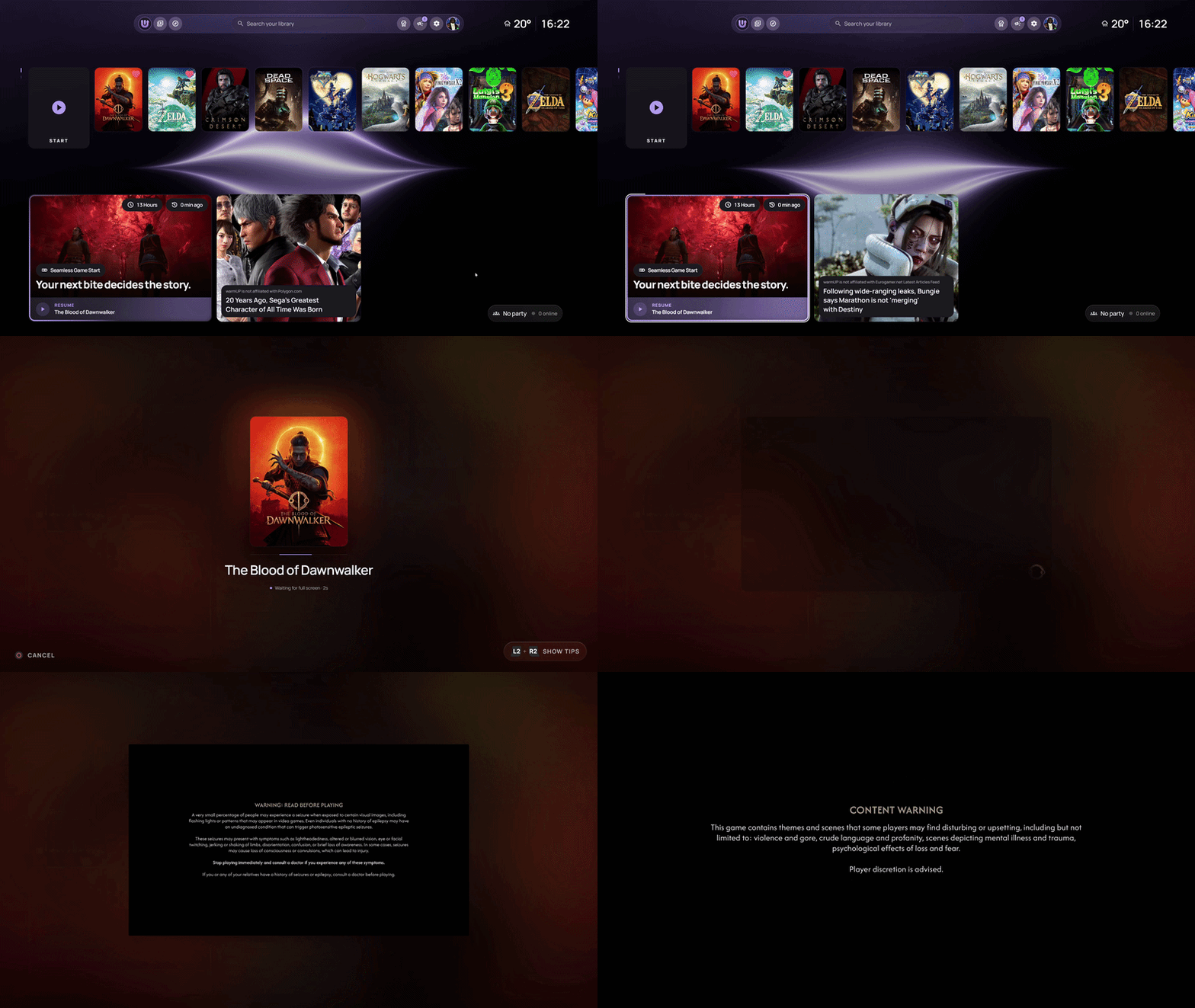
warmUP Seamless Game Start — pick a game and play without store windows stealing focus
The headline feature

One click. Straight into the game.

Pick a title and warmUP handles the launcher detour in the background. No store window stealing focus. No desktop hop. You're in.

Emulators belong in the same library.

Retro sits next to Steam and Epic. Same controller flow. Same Seamless Game Start. No second frontend, no setup maze.

  • NES
  • SNES
  • N64
  • GameCube
  • Wii
  • Switch
  • PlayStation
  • PSP
  • Game Boy
  • DS
  • Arcade
  • Custom cores

Video hosted by YouTube. Nothing loads from YouTube until you hit play and confirm.

See the ecosystem

From couch to game, without the detour.

  • Bring every game home
  • Your party is already there
  • One click. Straight into the game.
  • Know the game before you play
  • Always know what to play next
  • Make it feel like your console
Notonlyalauncher.
Awholeecosystem.
SeamlessGameStart.
Emulatorsincluded.
Everystore.Onelibrary.
Oneclick.Straightintothegame.
Madeforthecouch.

Game titles, cover art and brand logos shown belong to their respective owners and appear here for illustration only. warmUP is not affiliated with, endorsed or sponsored by them.

The rest of the ecosystem

Everything between you and the game gets quieter.

One library. One controller. One start. Everything below ships in the free version.
Choose a game, not a launcher

Steam, Epic, GOG, Xbox, EA, and the rest live in one calm library — installed, ready, hidden, or queued.
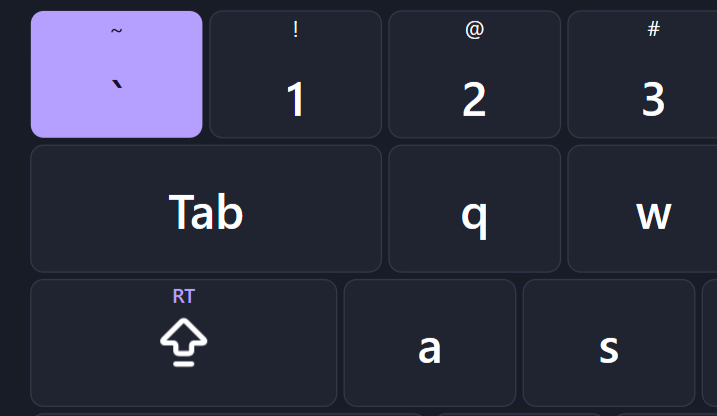
warmUP native virtual keyboard for controller input on a TV gaming setup

Leave the keyboard behind

Controller input, haptics, and a native virtual keyboard keep you in control — even at Windows sign-in.

Pick up where you left off

Your last session waits front and center, so the next thing you see is the game you already want to play.

Install without leaving the couch

Track downloads and manage Proton or Wine compatibility layers without leaving warmUP.
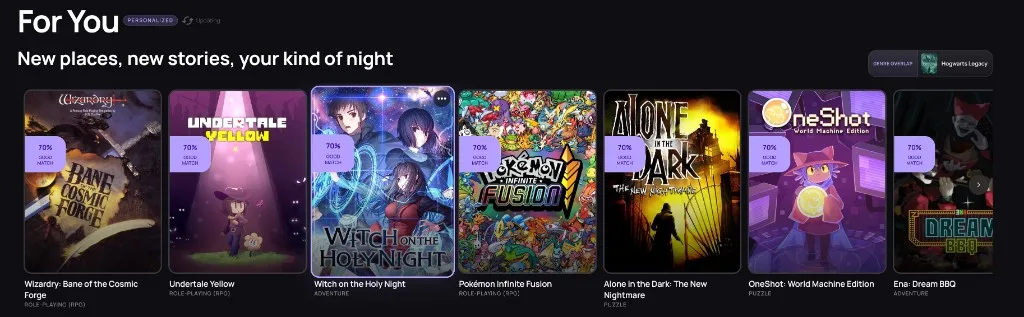
warmUP personalized game discovery feed showing recommended titles from your library

Always know what to play next

Recommendations, trailers, soundtrack moments, and useful context shaped by the games you actually own.

Free forever

The console feeling shouldn't require another subscription.

The complete warmUP ecosystem stays free for everyone, supported by a small number of clearly labeled ads. Import every store and emulator, connect Discord, and use Seamless Game Start without a trial clock or payment details.

Optional subscriptions: Ad-free removes ads. Plus unlocks additional features. The free Basic version remains fully usable.

Every store and emulator in one library
Seamless Game Start on the free version
No trial clock. No required subscription.
Ad-free and Plus are optional upgrades

FAQ

Everything you need to know before you download

No setup surprises, no hidden trial, and no need to move or rebuy the games you already own.

What is warmUP?
warmUP is not only a game launcher — it is a free, controller-first ecosystem for the games you already own. Stores, emulators, friends, and Seamless Game Start live in one couch-first home, so PC gaming feels like play instead of system administration.
What is Seamless Game Start?
Seamless Game Start is the headline feature: pick a game and warmUP launches it without a store window stealing focus. The launcher detour happens in the background, so you go from library to play in one click — including titles you run through emulators.
Does warmUP support emulators?
Yes. Emulators sit in the same library as Steam, Epic, GOG, Xbox, and the rest. Retro titles use the same controller flow and the same Seamless Game Start — no second frontend and no setup maze.
Is warmUP free to use?
Yes. The complete warmUP ecosystem is free with no trial clock or required subscription. It includes library unification, Discord integration, gamepad support, emulator integration, Seamless Game Start, and every core feature. A small number of clearly labeled ads keep it free; optional plans are only for players who want an ad-free experience or additional tools.
Do I need to move or buy my games again?
No. Your games, purchases, and store accounts stay where they are. warmUP brings them into one library and launches them through the platforms you already use, so you can choose a game without first choosing a launcher.
Which game stores does warmUP work with?
warmUP supports Steam, Epic Games Store, GOG Galaxy, Xbox Game Pass, EA App, Ubisoft Connect, Battle.net, Amazon Games, and local game folders. It also integrates with popular emulators for retro gaming, in the same library.
When will warmUP be available to download?
warmUP is available now as a free download. Enter your email on the homepage, confirm optional product updates if you want them, and start the download.
Do I need a controller to use warmUP?
No. warmUP works with both controllers and mouse/keyboard. However, it is designed with a controller-first approach, making it ideal for couch gaming on a TV.
How is warmUP different from PlayNite?
PlayNite is a powerful open-source library manager, but it requires plugin setup and configuration. warmUP works out of the box with no setup needed and is designed specifically for couch and TV gaming with a controller-first interface, Seamless Game Start, and emulators in the same library.
How is warmUP different from Steam Big Picture mode?
Steam Big Picture only shows your Steam games. warmUP unifies games from Steam, Epic, GOG, Xbox, other stores, and emulators into one library. You get the console experience without being locked to a single store.
Does warmUP work on handheld PCs like the ROG Ally or Legion Go?
Yes. warmUP works on any Windows PC, including handheld devices like the ASUS ROG Ally, Lenovo Legion Go, and Steam Deck in Windows mode. The controller-first design makes it a natural fit for handheld gaming.
Will warmUP work on my TV?
Yes. warmUP is built for TV and living room gaming. It runs on your Windows PC connected to a TV via HDMI, with an interface optimized for large screens, controller navigation, and automatic HDR detection.
What makes warmUP a console-like experience?
warmUP gets the desktop, launcher switching, and setup ritual out of the way. A TV-optimized interface, full controller navigation, one library — stores and emulators together — and Seamless Game Start create one continuous experience: sit down, pick a game, and play.

Your whole library. Leave the desktop behind.

Get the ecosystem free now. One email, zero payment details, download in seconds.

By continuing, you share your email so we can start your free warmUP download. Next you choose whether you also want product updates by email — download-only means no further email from us. See our Privacy Policy.

Free forever · No credit card · Free download.

5,278+ players are already visited warmUP